Degreed Live Events
Degreed Live Events make it possible for learners to discover events that are to their interest. They can view event information, register for sessions, and join them. All easily from the platform. These Live Events tell you of upcoming events, when and where they are taking place live, including if different sessions are available. L&D admins can easily create new Live Events and curate them throughout the platform for learners to discover.
The challenge
Degreed has had Events on the platform for a longer time. These were however very static in their nature. L&D admins could add them to the platform with rudimentary information such as event title, URL, and a description. Learners could—upon discovery on the platform—view that basic information and choose to visit the external URL. Lastly, Events from third-party integrations that were live by nature, were not treated as such.
We wanted to make Events a first class citizen and more engaging on the platform by adding a live aspect to them. Giving authors more options during creations, and learners the means of discovering, registering, and attending Live Events all from within Degreed platform.
The approach
What makes an Event distinctly live depends on a few factors, with the following being key: location and time. With location being either in-person, online, or hybrid. The existing Events did not support either of them.
By adding these elements on top of the existing Events we were able to make this platform feature more usable and engaging.
The solution for Learners
Once learners discover interesting Live Events, we want to enable them to learn more about an event and provide means to register for them.
Initial work started on showing Live Events on the previous version of the Learner Home—this is the learner’s homepage where everything comes together.


While we were figuring out more on how the feature should work, another team started working on the redesign of Learner Home. I was brought in to lead the redesign of all the content cards on the platform. This opened the opportunity to do more with Live Events and present them in a better way on the homepage. They would replace the initially sketched out elements in the sidebar.
The design of the new Content Cards deserves its own case study. But for our team it meant we could make the cards a more holistic experience, including a newly designed card for Live Events. The process of designing the new cards dictated how the Live Events cards would function, and look like. With a few exceptions that are unique to events.
For learners the experience was improved with the following:
- See important information such as location, time, state of registration
- See when an event is currently live and join in case of registration
- Have a more detailed view of the event including sessions
- Directly register for an event from the platform (through supported integrations)


The holistic approach with the design of the new Content Cards made sure that they could be used on various places on the platform. Meaning that if necessary they could take a different shape. This made it possible to add any content item—thus also Live Events—to Pathways.

The solution for L&D admins
As mentioned earlier, our team worked on projects that needed to solve for multiple personas; learners and L&D admins. The latter group being the users that author and curate content on the platform.

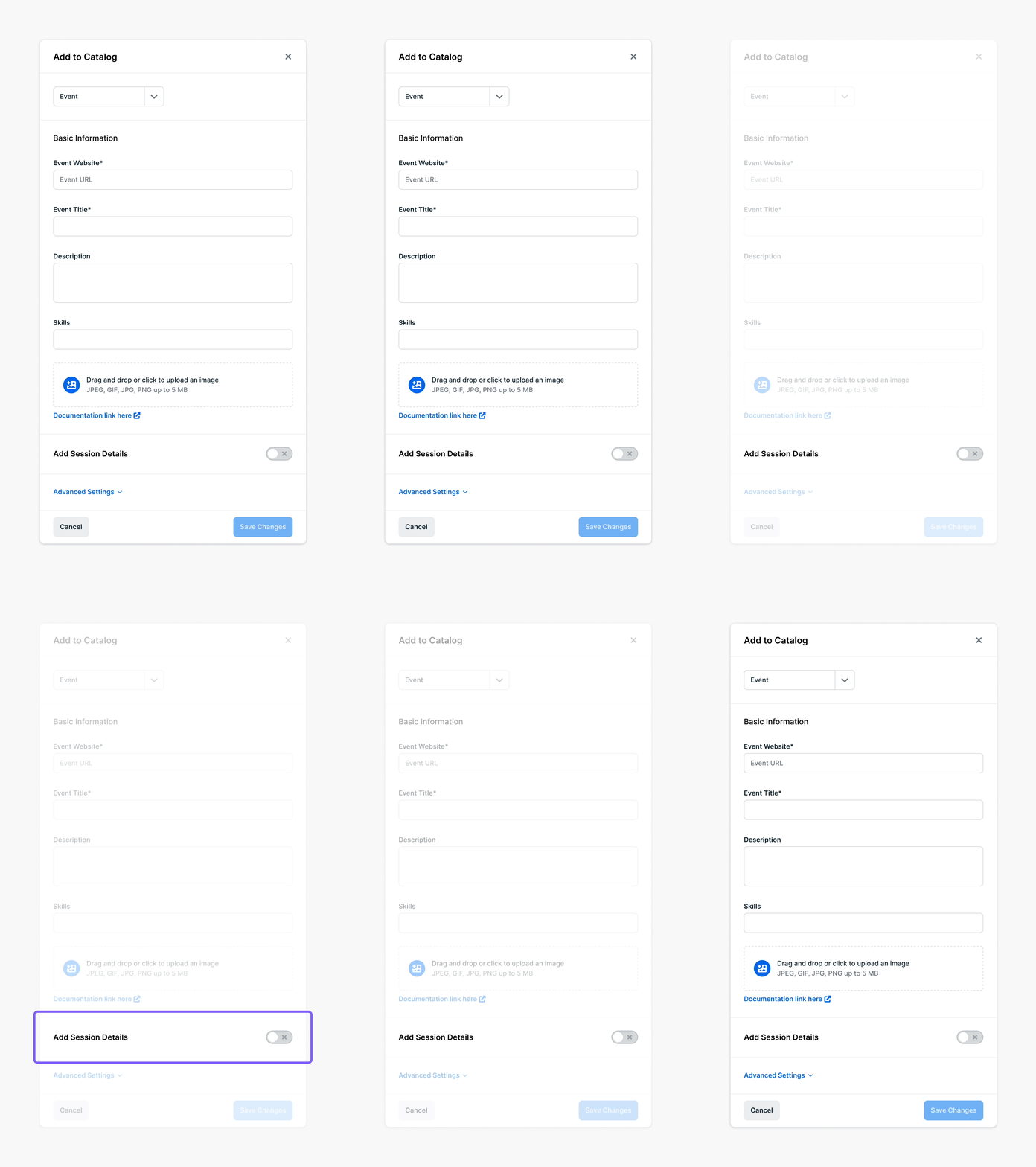
For these authors we needed to look into how they could best create Live Events. The original Events authoring modal provided a means to add them into the platform catalog. But to have these become live, we needed to refactor the authoring modal.
The improvements that we added in the new authoring modal:
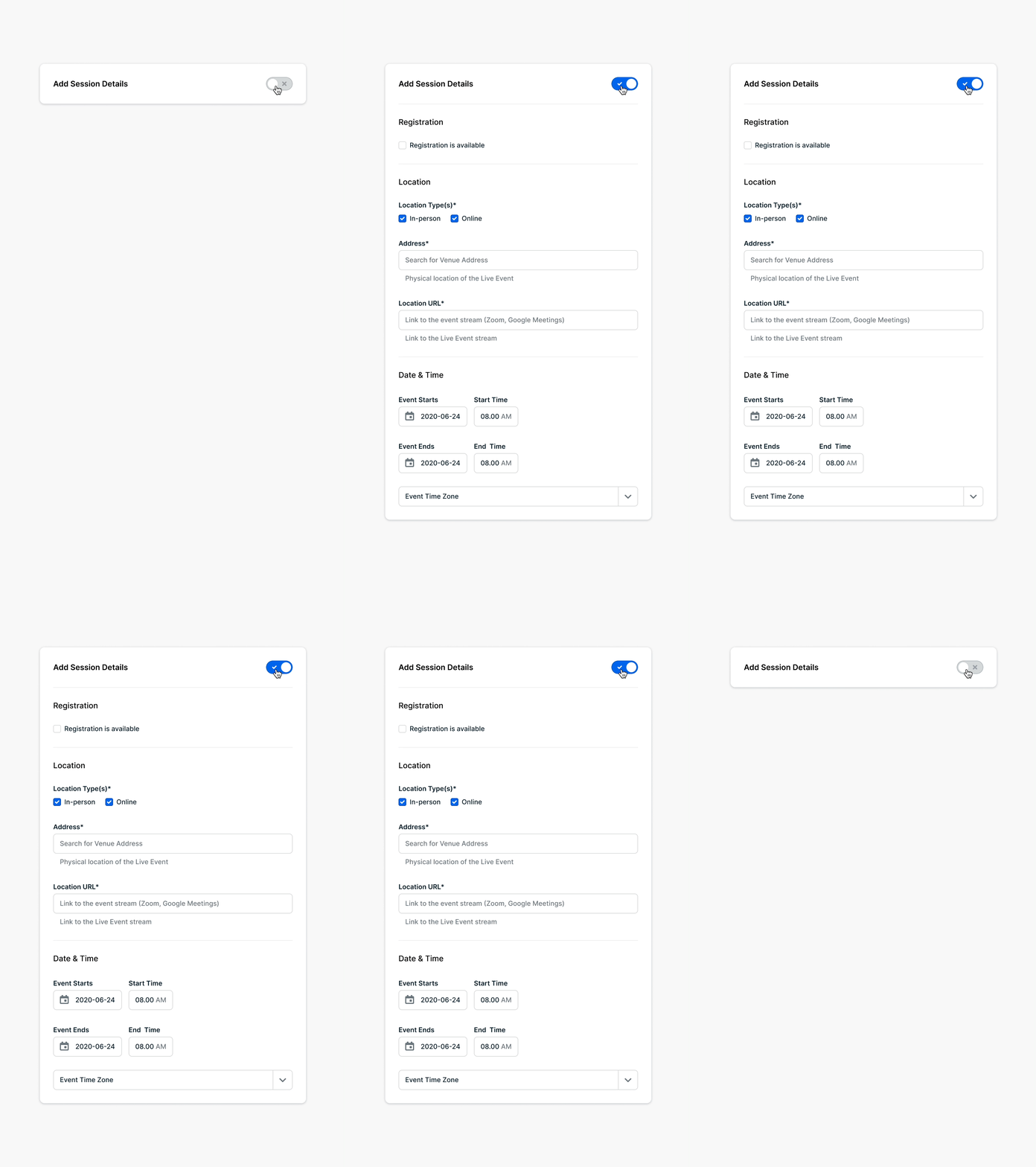
- Possibility to turn Events into Live Events by enabling a session
- For physical locations authors can start typing their address and with the help of Azure Maps API we will autocomplete it for them. This prevents wrong addresses or variants that dirty up the database
- Add the starting end ending time of a Live Event. The author’s time zone is automatically selected, and this time propagates to throughout the platform to show the correct time and date for each user’s time zone
- When authors provide a URL to the event website, we try to import any or all of the following data automatically: event title, description, and image
- As the modal started to get somewhat large, we grouped elements into sections with a dedicated heading
- The least used options were moved into a separate advanced section and collapsed to clean up the modal


End result & future improvements
Adding a live character to Events made this platform feature the more usable, making it a first-class citizen. We are delighted by the positive feedback we received from customers, and are looking forward to make Live Events even better.
First on the roadmap is adding support for multi-sessions while authoring, giving L&D admins the possibility to create these. As this will get complex fast, we might need to explore other options than authoring through a modal. A second improvements we are looking into is creating a dedicated place on the platform where learners can find back all of their events, whether registered for, saved for later, completed.